Start with the right questions
Choose a service project, website or event preset. Edit the questions before creating the brief, then assign an existing WordPress client account.
Client Brief Deskv1.0.0 · Free
Client Brief Desk is a free WordPress client intake and approval plugin for service businesses. Give clients one place to answer your questions, save their progress and submit a brief you can actually review.
For studios, photographers, consultants and small service teams.
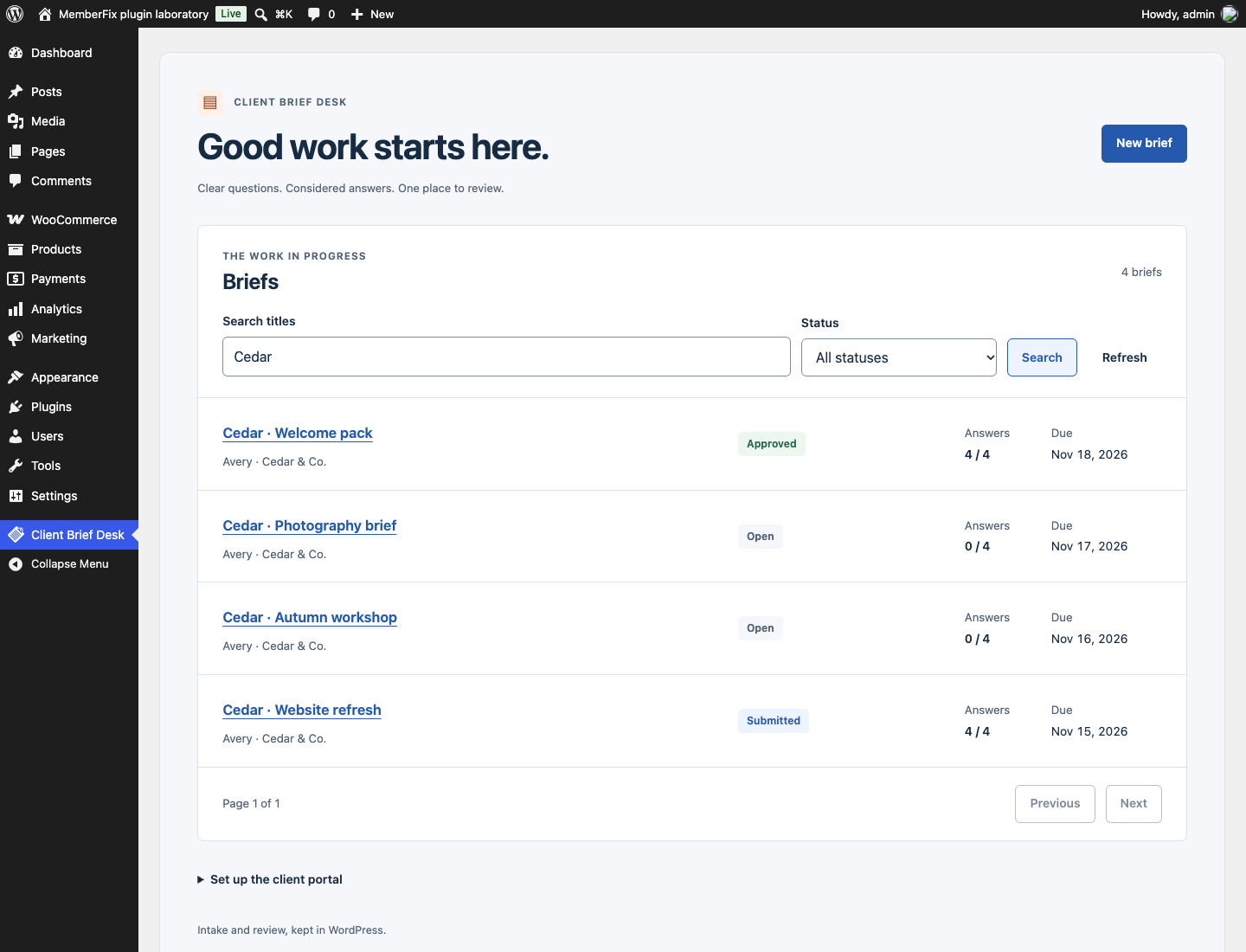
A useful client brief should not depend on finding the latest email attachment. Clients see their assigned briefs and can work at their own pace. Staff review a specific submission, request changes with context and keep internal notes out of the client view.
Choose a service project, website or event preset. Edit the questions before creating the brief, then assign an existing WordPress client account.
Required-answer progress and saved drafts make the next step clear. Clients can access only their assigned briefs.
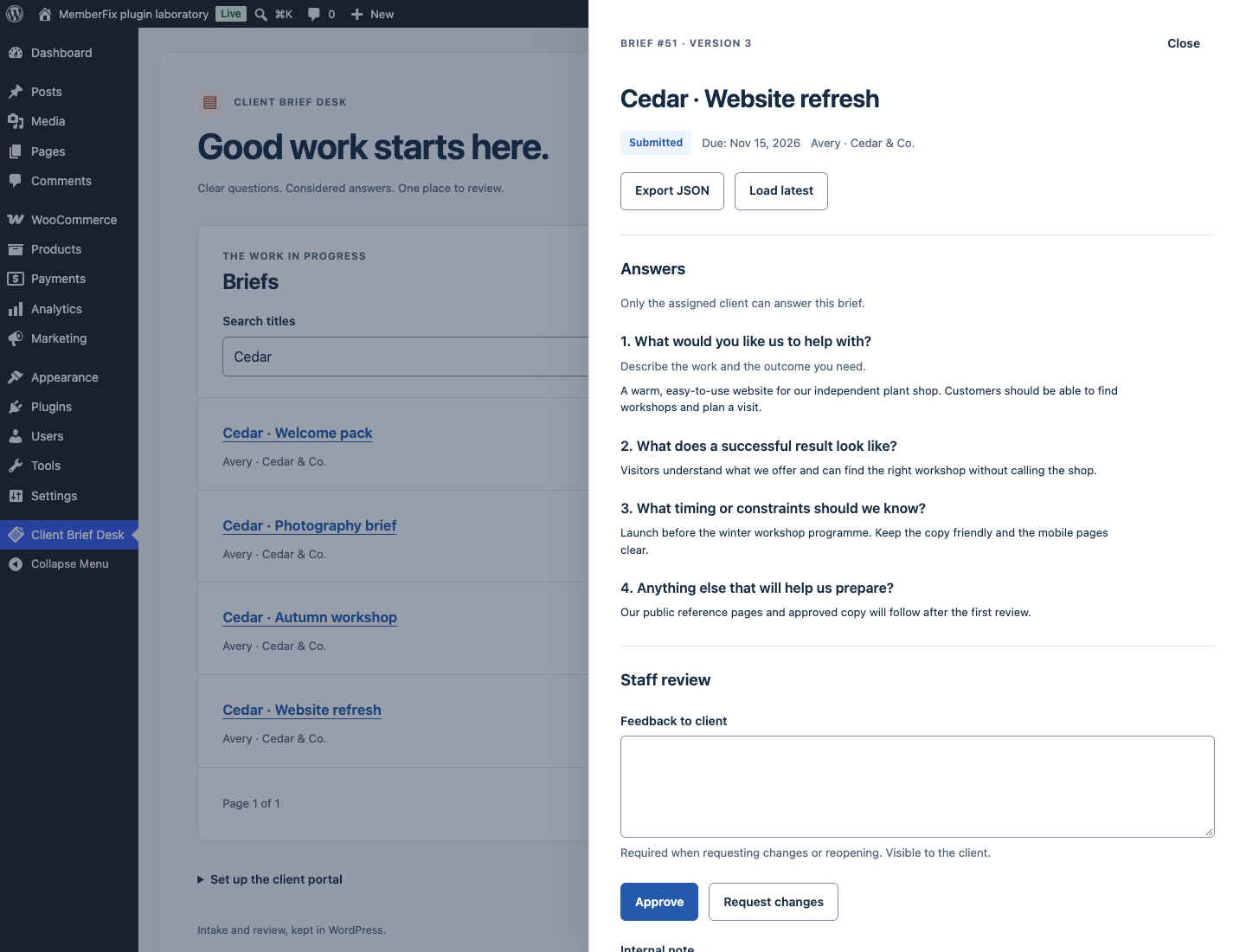
Submitted answers stay read-only until reopened. Decisions and submission snapshots stay in the history; conflicting edits keep the draft for comparison.
Step-by-step tutorial
Try the workflow on a staging site with a test client account first. You do not need a separate client-portal service or a paid add-on.
Get the installable ZIP ↗Download client-brief-desk.zip from the release below. In WordPress, go to Plugins → Add New → Upload Plugin, upload the ZIP and activate it.
Add a page called “Client portal”. Insert a Shortcode block containing [client_brief_desk], then publish it. Exclude this signed-in page and the plugin REST routes from shared page or CDN caches.
Use an existing WordPress account for the client, or create one through Users. A Subscriber account is sufficient. Share the portal link through your usual communication channel; the plugin does not send invitations.
Open Client Brief Desk → New brief. Choose a preset, edit the questions, assign the client and optionally add a due date. Review the questions before creating it: the client and question structure are fixed afterward.
The client signs in, saves a draft and submits when ready. Open the brief as an administrator. Choose Request changes with feedback, or Approve the submission you reviewed. Staff notes stay private. Reopen explicitly if an approved brief needs another revision.
Choose the right tool
Before you install
Yes. Client Brief Desk uses WordPress accounts and its own brief storage. It does not require WooCommerce, MemberPress or LearnDash.
The plugin checks the signed-in account on list, detail, write and export requests. Clients see only their assigned work. Administrators can create and review briefs. Keep logged-in portal pages out of shared caches.
No. The client and question structure are fixed after creation. Create a new brief if you need different questions or a different client. A revision request reopens the answers while preserving earlier submissions.
No. Share the portal page through your existing email or messaging process. Due dates are informational. There is no automatic email or notification service.
Yes. All shipped features are GPL-2.0-or-later, with no license key, SaaS account or paid dependency.
Your site. Your data. The full source.
Download v1.0.0, read the setup guide and try the workflow on your staging site.
Found a reproducible problem? Open a GitHub issue. Keep customer records and credentials out of public reports.
Need help with an integration? Talk to MemberFix Studio.